
Dropbox Account Breach: Lenovo ID Integration and Confirmed Impact
A legacy Lenovo ID integration enabled unauthorized access to about 5,000 Dropbox accounts. This report explains the confirmed impact and the checks users and administrators should complete.

Incident overview
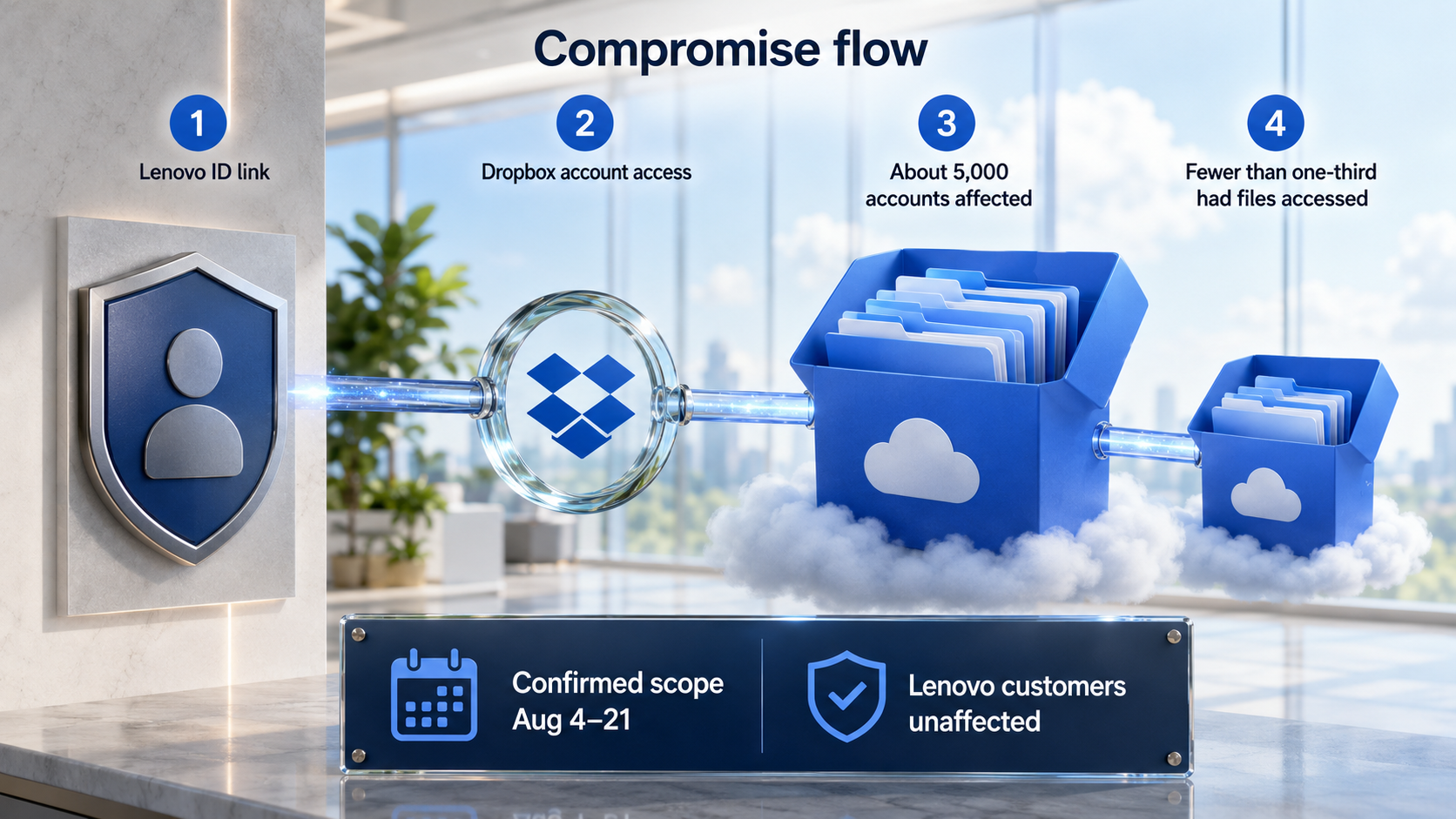
Dropbox said on September 1, 2026 that about 5,000 user accounts were accessed without authorization during August. According to company statements reported by Reuters, the access occurred from August 4 through August 21. Fewer than one-third of the affected accounts had stored files viewed or downloaded.
The access path was tied to a legacy integration between Dropbox and Lenovo ID. Lenovo said the integration could improperly authenticate certain Dropbox accounts. The companies drew a clear boundary: the incident affected Dropbox accounts reached through that integration, while Lenovo's own customers were not affected.
This differs from a routine password-reuse incident. The trust relationship between two services created an authentication route separate from the user's normal Dropbox password. Reviewing an account therefore requires checking old identity links, connected apps, devices and active sessions.
Confirmed impact
Dropbox confirmed approximately 5,000 affected accounts. File access occurred in fewer than one-third of them. Account access and file access should not be treated as the same event: not every affected account had stored content opened, and Dropbox distinguished users whose files were accessed in its notifications.
The confirmed access window was August 4 through August 21, while notification and public reporting followed on September 1. Dropbox secured affected accounts, notified regulators, terminated sessions authenticated through Lenovo ID and removed those identity links. Access now requires a Dropbox password.
The identity-link boundary
Federated sign-in causes one service to rely on another service's authentication result. If that trust path is weaker than the primary login, access may bypass the password users assume protects the account. Dropbox's session termination and link removal cut that route.
Two-factor authentication and connection review address different paths. Dropbox connected the incident to accounts linked through Lenovo ID without 2FA. Users should enable Dropbox's own 2FA while also removing unnecessary apps, devices and web sessions.
User account checks
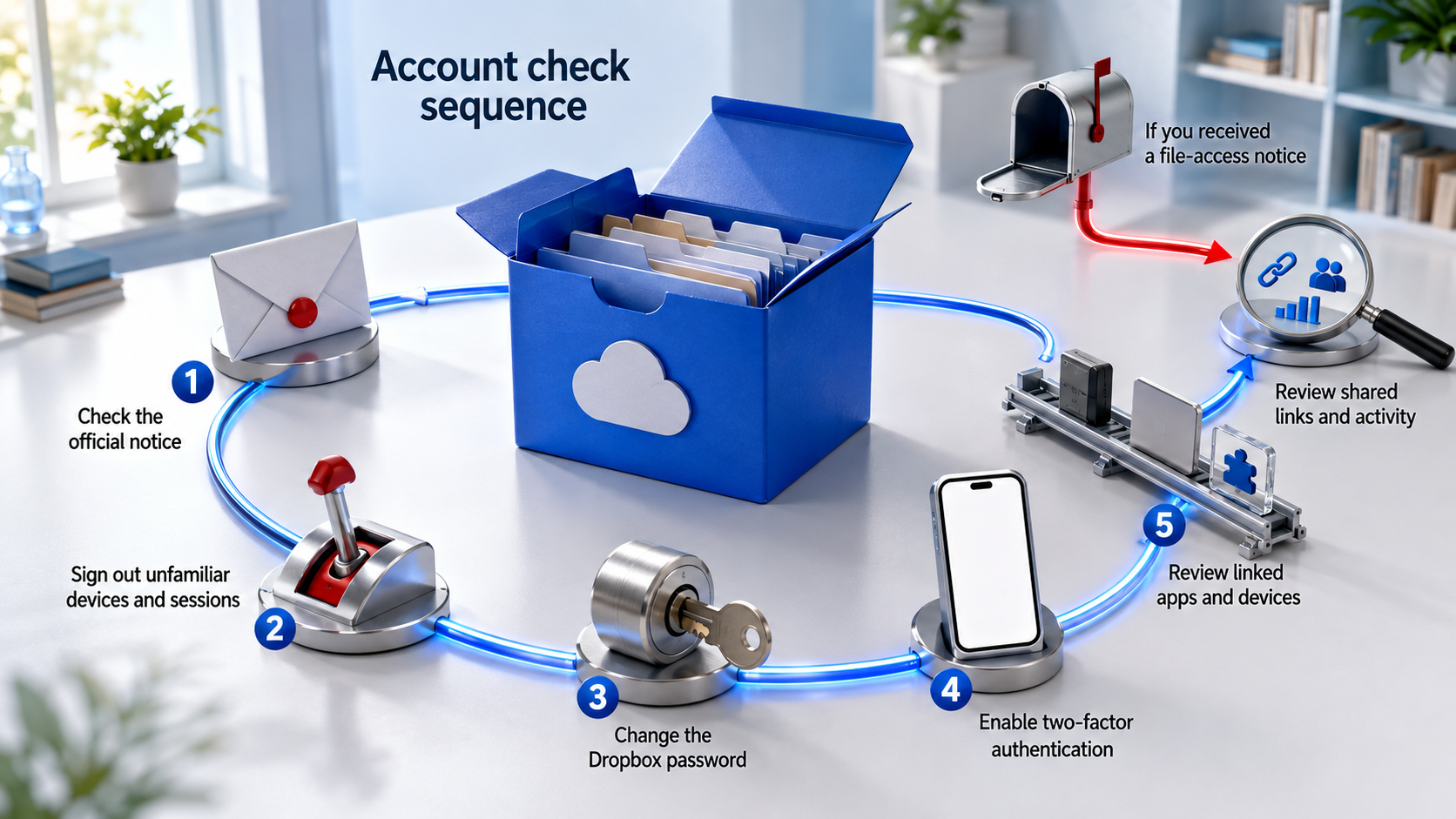
Start with the official Dropbox notice. Open dropbox.com directly and use the Security tab and Dropbox's security checkup. The checkup reviews the account email, devices, linked third-party apps, password and two-factor authentication.
- Review signed-in devices and web sessions, then remotely sign out entries you do not recognize.
- Change the Dropbox password to a unique value and replace reused passwords on other services.
- Enable two-factor authentication and store recovery codes safely.
- Review linked apps and devices, removing connections that are unused or unfamiliar.
- If Dropbox notified you of file access, review recent activity and shared links and remove unnecessary access.
Dropbox's official guidance explains how to view a device's last known location and remotely sign out devices, browser sessions and linked apps. When an unfamiliar entry appears, terminate it and continue with password and two-factor authentication checks.
Users who received a file-access notice should separate account recovery from sharing cleanup. Password changes and session termination reduce further access; reviewing shared links and collaborator permissions reduces exposure through existing sharing paths.
Administrator checks
Organizations should inventory external identity providers, legacy SSO links, exception paths and long-lived sessions. Disabling an integration and invalidating already issued sessions are different operations, so both states need verification when a partnership or identity provider changes.
Logging should distinguish direct password authentication from external identity authentication and correlate session creation with file view and download events. That evidence helps narrow actual impact and supports consistent notification, link cleanup and incident records.
The incident shows that cloud account security extends beyond one password. Users and administrators need to manage trust relationships and sessions as account assets, using Dropbox's official security controls to review the affected scope and close unnecessary paths.
Sources reviewed
- Dropbox says about 5,000 accounts compromised in August hackReuters
- How to protect your Dropbox account if it's been compromisedDropbox Help Center · Official source
- The security checkup toolDropbox Help Center · Official source
- How to turn 2-factor authentication on and offDropbox Help Center · Official source
SECUFOCUS NOW reorganized and analyzed the material above. This article does not replace the original sources.
Related SecuNote articles
Langflow Code Injection RCE (CVE-2026-0768): Active Exploitation and Response
CVE-2026-0768 is now being exploited against internet-accessible Langflow deployments. This analysis explains the vulnerable…

Sality Botnet Disruption: How the P2P Sinkhole Cut Its Command Path
A multinational operation disrupted Sality's peer-to-peer command path across more than 15,000 infected hosts. This analysis…
Novocure Cyber Incident Exposed Patient and Contact Records
Unauthorized access to a Novocure subsidiary exposed internal patient IDs and a smaller set of identifying and contact records in…
Comments
No comments yet.