
August 30 Consumer Security Briefing: Fake Interview Apps, GTA 6 Downloads, and Municipal Invoices
Three recent schemes exploit trusted moments—a job interview, a highly anticipated game search, and a municipal invoice. This briefing explains how to verify each one before installing software, signing in, or sending money.
The reference time for this briefing is August 30, 2026 at 4:00 p.m. KST, covering developments from August 23 at 4:00 p.m. through August 30 at 3:59 p.m. KST. This week’s three schemes begin at moments people are inclined to trust: a recruiter arranging an interview, a search result promising an anticipated game, and an invoice bearing a local authority’s name. Focus first on the action you are being asked to take. Stop when that action moves you outside the service’s official channel.
The branding differs, but the trust mechanism is the same. Each scheme borrows a real platform, announcement, or department name, then redirects the target to an installer, login screen, or payment route controlled by the sender. The fastest checks are therefore distribution location, officially listed platforms, sender domain, and the original payment portal—not how convincing the logo looks.
Android interview apps used as the lure
Malwarebytes reported on August 26 that scammers targeting Indeed job seekers had requested installation of Android apps with names such as “Interview App” and “MyInterview.” A fake vacancy or recruiter message led to an APK presented as necessary to complete an interview, verify identity, enter a recruitment portal, or sign a salary agreement. A file delivered through a message or an unfamiliar interview site, rather than an official app store, is the clearest point to stop.
The analyzed app imitated an Indeed sign-in page and created a VPN connection after an email address was entered. It was classified as a Trojan dropper capable of installing additional untrusted apps, with spyware observed as the final payload during the investigation. Accessibility access could allow the app to read the screen or act on the user’s behalf, while observed anti-removal behavior could push the victim away from the uninstall screen.
Indeed said interviews conducted through its platform take place in a browser and do not require a special interview app. Its official Android app is distributed through Google Play. If a purported recruiter asks for an APK, VPN connection, and invitation code, pause the process. Reopen the original job listing and independently locate the employer’s careers page and contact details. Compare the business address and vacancy, not just the company name.
Separating an affected device
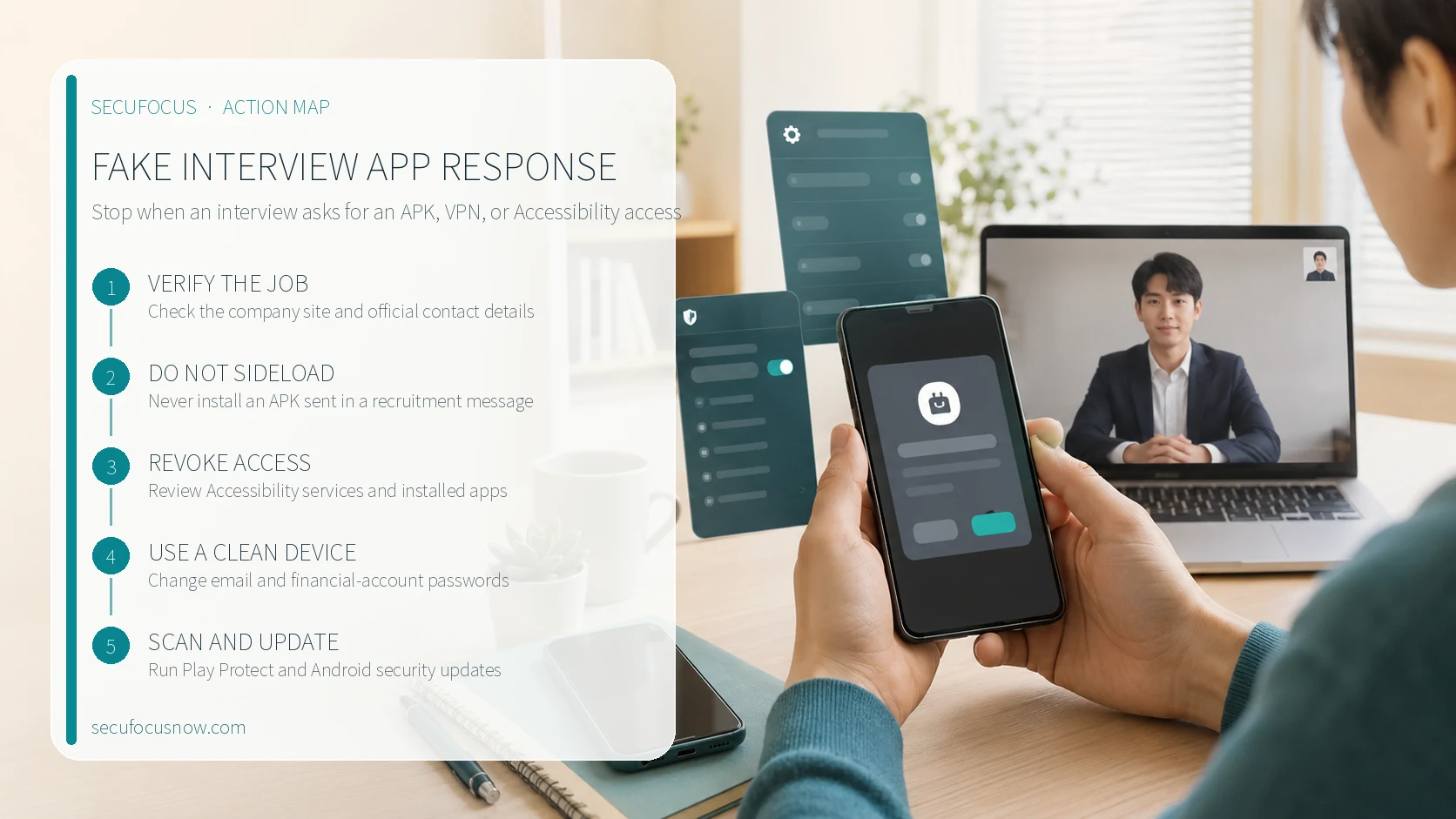
- Stop using financial and email apps on the affected phone and disconnect it from networks.
- From a clean device, change the primary email and financial-account passwords, then review signed-in devices and sessions.
- Check the Android app list and Accessibility services, revoke the interview app’s access, and uninstall it.
- Run Google Play Protect and install Android security and Google Play system updates.
- Report the vacancy to the recruitment platform and notify your organization if work credentials or company data were entered.
If removal is repeatedly blocked or screens close on their own, do not keep changing passwords on the same phone. Secure a clean device first because the malicious app may be able to observe or interfere with the interface. Before any reset, review recovery methods and backups, then use the manufacturer’s support channel or an authorized repair route.
A fake GTA 6 demo targeting browser sessions
In research published August 24, Malwarebytes identified sites impersonating Rockstar Games and targeting people searching for a GTA 6 demo. Some search results offered buttons such as “Official Download” and “Play Now,” leading to a file named gta6_installer.exe. The pages combined copied promotional material and the August 27 Extended Look schedule with a fraudulent executable, blending real timing with a false download.
Rockstar’s official GTA VI page lists November 19, 2026 as the release date and names PlayStation 5 and Xbox Series X|S as the platforms. The Extended Look on that page is a video to watch. Claims of a PC demo, leaked build, or tiny installer offered through a search ad or fan site do not match those official distribution details. Compare the platform, release date, and download options on the publisher page before relying on visual similarity.
The investigated executable was analyzed as Vidar information-stealing malware. It searched for saved browser passwords, session cookies, autofill data, browsing and download history, and credentials from some email and FTP clients. A stolen session cookie may leave an already authenticated session usable even after a password change. Recovery therefore includes signing out all devices or terminating active sessions.
If the file was downloaded but never opened, delete it without running it and perform a security scan. If it was executed, disconnect the PC from the network and scan it with a trusted security product. From a clean device, change the primary email, payment, gaming, and shopping account passwords, then end all sessions. Review email forwarding rules, recovery addresses, phone numbers, connected apps, and unfamiliar devices as well.
Official distribution check
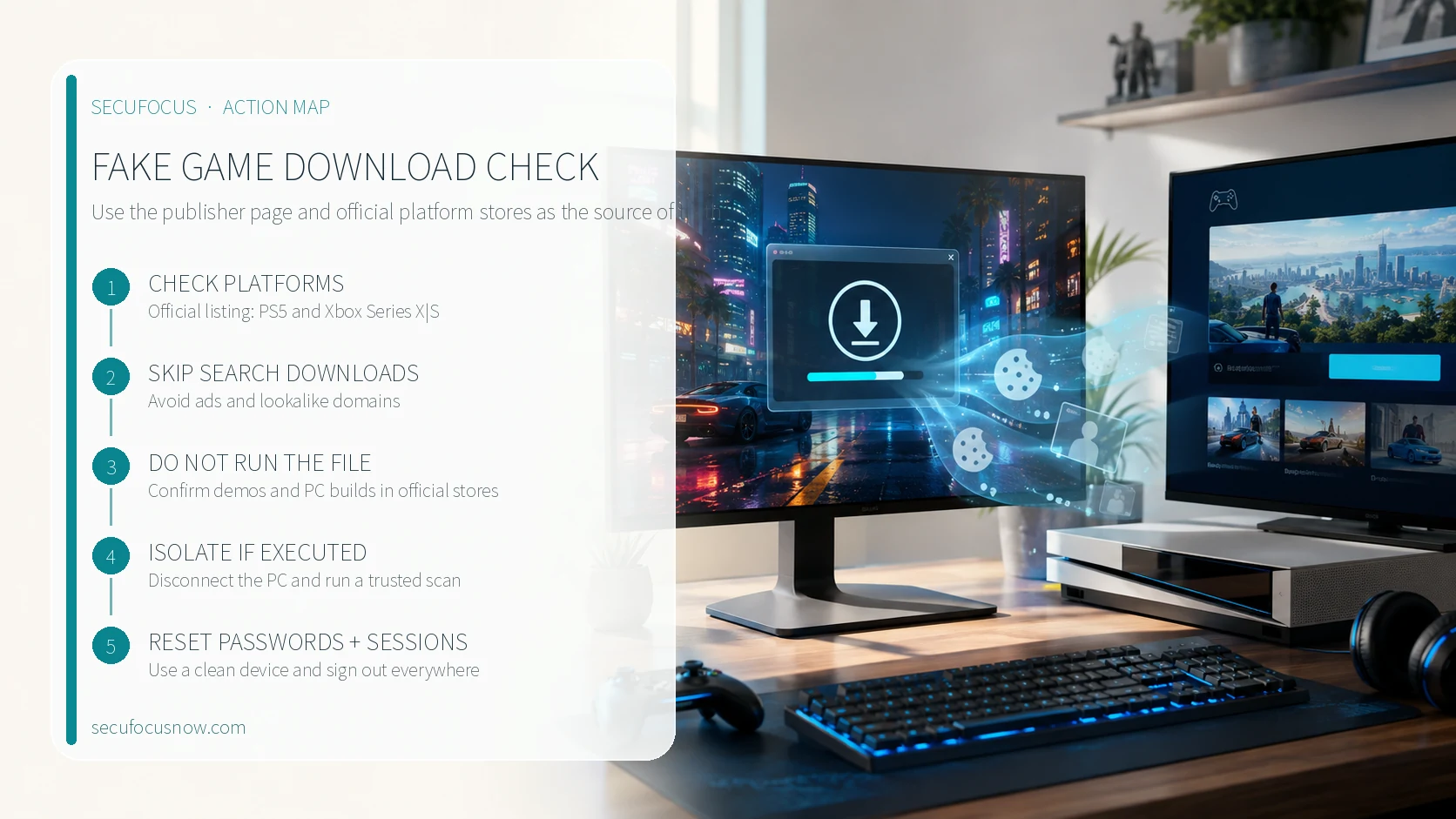
- Confirm the release platforms and date on the publisher’s official product page.
- Search for demos or trials directly in an official platform store.
- Do not use sponsored results or lookalike domains as software download routes.
- If an executable opened with no visible window, still review accounts and sessions.
- Check saved payment methods and item-trading history on gaming accounts.
Municipal names on fraudulent invoices
The Town of Brunswick, Maine warned on August 24 about fake emails and invoices impersonating real departments, while the Village of Scarsdale, New York issued an August 25 warning about messages posing as land-use and building officials. Brunswick said the messages used names such as the Planning Board and Zoning Board of Appeals and requested payment by wire transfer. Someone already involved in a permit or land-use process may genuinely expect a fee notice, so correct department and application details are not enough to authenticate the sender.
A fraudulent invoice may create urgency around an overdue charge, approval delay, or incomplete application. The correct response is not to study the attachment’s bank details more carefully, but to reopen the original application portal and contact the authority through details found independently. Brunswick identified @brunswickme.gov and @civicplus.com as its legitimate email domains and stated that the Town does not ask people to wire money.
Permits, fines, utilities, and taxes are effective impersonation themes because public agencies legitimately collect money. Do not verify the email using its reply address, embedded link, or a phone number printed in the PDF. Open the agency’s official website yourself and locate its main number and online payment path. Even when the application number and amount look right, pause if the account holder, payment category, or payment location differs from the official process.
Five-minute payment check
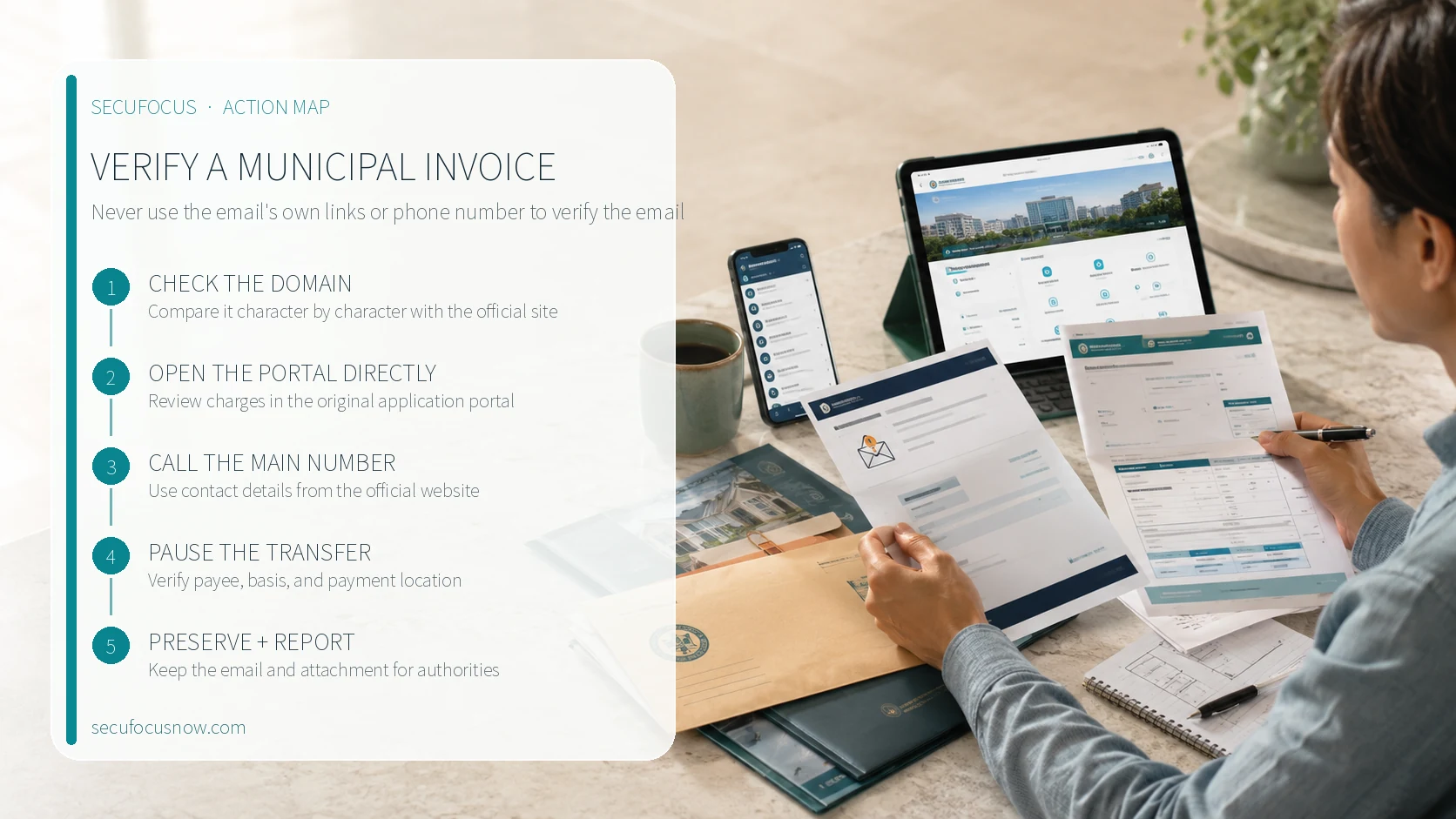
- Compare every character after the @ sign with the domain shown on the authority’s official website.
- Use the original application portal or a directly entered official website to review the charge.
- Call the department through the website’s main number, not a number in the email.
- When a transfer is urgent, verify the payee and the basis for the charge through a separate channel.
- Preserve the original email and attachment, then report the fraudulent invoice to the authority and police.
If money has already been sent, contact the financial institution immediately and ask whether the transfer can be stopped, then make a police report. If a password or personal data was entered, change the relevant portal password and any other account using the same password. Tell the authority which application number and personal details appeared in the message so it can warn other applicants with precise information.
One security habit for this week
Separate the requested action from the channel used to verify it. Check an app request in the official app store, a game download on the publisher page and platform store, and a public-agency invoice in the original application portal or through the main number on the official website. A message cannot reliably authenticate itself through its own links, phone number, or attachment.
Related guides
Entered card details on a phishing page? Stop the card and check for damage https://secufocusnow.com/en/notes/card-details-entered-phishing-page-response-korea
Unknown remote-control app on a Windows PC: where to check and how to protect it https://secufocusnow.com/en/notes/windows-pc-unknown-remote-control-app-check
Sources
Malwarebytes: fake Indeed interview apps (August 26, 2026) https://www.malwarebytes.com/blog/scams/2026/08/beware-of-fake-indeed-interview-apps-used-to-install-spyware
Indeed safe job-search guidance https://www.indeed.com/help/job-seekers/topics/200771644-job-search-tips
Google: remove malware or unsafe software on Android https://support.google.com/accounts/answer/9924802?co=GENIE.Platform%3DAndroid&hl=en
Malwarebytes: fake GTA 6 demo sites (August 24, 2026) https://www.malwarebytes.com/blog/threat-intel/2026/08/fake-gta-6-extended-look-and-demo-sites-deliver-an-infostealer
Rockstar Games official GTA VI page https://www.rockstargames.com/VI
Town of Brunswick fake email and invoice warning (August 24, 2026) https://brunswickme.gov/m/newsflash/home/detail/626
Village of Scarsdale land-use and building impersonation warning (August 25, 2026) https://www.scarsdale.gov/m/newsflash/Home/Detail/942
More incident analysis and practical security guidance is available at secufocusnow.com. https://secufocusnow.com
Sources reviewed
- Beware of fake Indeed interview apps used to install spywareMalwarebytes
- Job search tipsIndeed · Official source
- Remove malware or unsafe softwareGoogle · Official source
- Fake GTA 6 Extended Look and demo sites deliver an infostealerMalwarebytes
- Grand Theft Auto VIRockstar Games · Official source
- Notice of Fraudulent Emails and InvoicesTown of Brunswick · Official source
- Scam Alert: Fraudulent Emails Impersonating Land Use and Building OfficialsVillage of Scarsdale · Official source
SECUFOCUS NOW reorganized and analyzed the material above. This article does not replace the original sources.
Related SecuNote articles

Cloned Car Dealership Websites: How to Verify a Vehicle Before Paying
Scammers are cloning real car dealership websites, listings, photos, reviews, and sales policies to demand upfront wire payments…
Unfamiliar Configuration Profile on iPhone? Check Management and Secure the Device
Configuration profiles can apply work or school accounts, VPN settings, certificates, and other controls to an iPhone. This guide…
Fake Buyer-Protection Portals: Refund, ID and Bank-Detail Checks
A newly disclosed HKICL impersonation scheme combined refund support, identity verification, bank details, a fake wallet and an…
Comments
No comments yet.